How to secure your home Wi-Fi network? Router settings the technician didn’t tell you about
Most of us treat a home router like a household appliance. We plug in the cables, make sure the right lights are on, enter the password on our phone, and forget about it, letting the “internet box” gather dust. It is natural, because technology is simply supposed to work.
However, from a cybersecurity perspective, it is the central nervous system of your digital life at home. Factory settings do not protect you from anything. In reality, you are leaving the door ajar for cybercriminals. Here are five of the most important steps to ensure your router is responsible not only for providing the internet but also for the security of your home network.
Distinguish between router passwords
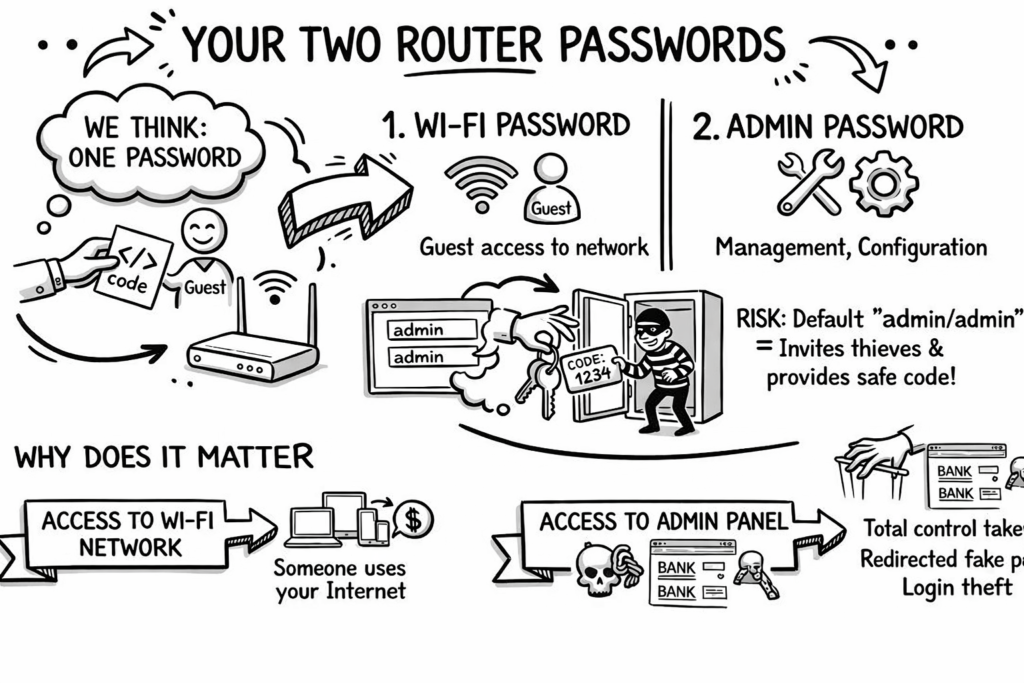
Most of us think we have one router password – the one we give guests so they can connect to our network. This is a mistake, because your router has two entirely different security measures. These are: the Wi-Fi network password and the administrator password (used for managing and configuring the device). Leaving the latter in its deafult form of “admin/admin” is like inviting a thief inside and handing them the code to your safe.
It was precisely this carelessness and deafault passwords in controllers that led to a serious incident in the Polish energy sector in late 2025, which threatened a blackout for half a million people!
Read more on this topic: https://cert.pl/posts/2026/01/raport-incydent-sektor-energii-2025/
Why it matters: Access to the network allows someone to use your internet. However, access to the administrator panel allows them to take full cotrol over your web traffic, redirect you to fake banking websites, and steal your logins.
The guardian of the home network: the power of secure DNS
Did you know that you can block malware for all devices in your home at once by changing just one string of numbers in your router settings? DNS servers are used for this. Their job is to translate friendly names (e.g., google.com) into IP addresses that computers understand. Default DNS servers from internet providers rarely offer additional protection. Changing them to public, secure servers (e.g., from Cloudflare: 1.1.1.2 for malware blocking or 1.1.1.3 for blocking both malware and adult content) acts as a filter for the entire family.
Why it matters: Instead of installing filtering software on every single phone, tablet, and TV separately, you cut off threats right at the “front door” to your home.
Home Wi-Fi network encryption standards
Data transmitted between your phone, laptop, or other device and the router “flows through the air”. To prevent anyone from the outside from eavesdropping on and reading it, it is encrypted. The current standard providing the highest security is the WPA3 protocol, introduced in 2018.
If your router has the WPA3 option in its settings, make sure it is turned on. If it is older, use at least WPA2 combined with the AES algorithm and a long, complex key.
Why it matters: Weak encryption means that and intruder within network ranger can “eavesdrop” and reconstruct passwords and messages using simple programs.
“The longer the enryption key for our data, the more secure the communication is, because a given encryption key is harder to break.” (Jakub Derda)
Hiding the Wi-Fi network (SSID)
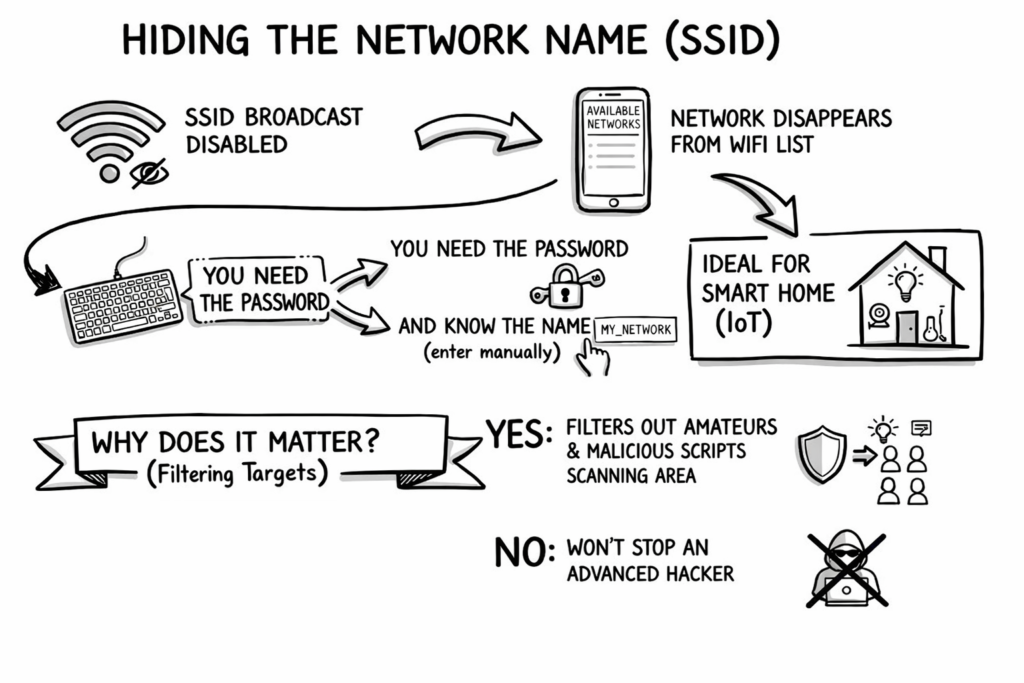
Your network does not have to broadcast its existence to the whole world (and all your neighbors). Disabling the SSID broadcast option simply makes the network name disappear from the list of available Wi-Fi connections on phones and computers in the vicinity. To connect to it, you not only need to know the password but also know exactly what the network is called in order to type it in manually. This is a great solution, especially for dedicated subnets where you connect Smart Home devices (the so-called Internet of Things, IoT).
Why it matters: Hiding the SSID won’t stop an advanced hacker, but it will effectively filter out curious amateurs and malicious, automated scripts that scan the neighborhood lookings for easy targets.
The innocent "set it and forget it" habit - postponing updates
Both computers and smartphones regularly remind us about updates. Routers usually do not do this, “suffering” in silence, because their firmware may contain security vulnerabilities that manufacturers patch over time.
Criminals are constantly looking for software flaws in old routers. Regular updated are like patching holes in a virtual fence. An un-updated router is defenseless against newly discovered attack methods.
A reflection for the future
Ultimately, the weakest link in a home network is never the hardware, but our convenience. Technology is becoming increasingly intuitive, but that does not relieve us of responsibility and paying a little attention.
Protecting your home network does not require a degree in computer science. Logging into your own router and changing just a few basic parameters will take you 15 minutes. It is the cheapeest and most effective investment in your home network’s security.
You can listen to the full interview on Radio Zachód by clicking here.
Looking to enhance your cybersecurity?
Contact us!
Leave your details – we’ll call you back
Our specialist will get back to you no later than the next business day. You don’t have to fill in the message field, but a brief note about the topic you’re interested in will be a valuable hint for us.