Your privacy for an “I Agree” button. Why does a calculator want to read your text messages? Dangerous mobile app permissions.
We install a new app. Excited about a new feature or simply wanting to get things done quickly, a pop-up appears asking for access. What do we do? In most cases, our thumb instinctively moves toward the “Allow” button.
We often treat these prompts as redundant bureaucracy – a hurdle on the way to our goal. Meanwhile, cybersecurity experts warn: this is a digital pact with the devil. Mindless clicking can hand over control of your phone to criminals in ways you’ve never dreamed of.
Here are the principles that will help you understand what you are actually agreeing to.
Dangerous mobile app permissions
Digital hygiene isn’t about being a tech or cybersecurity expert; it’s about staying vigilant online and paying attention to threats. Experts divide permissions into basic (low risk) and critical (dangerous). The latter include access to your location, camera, microphone, or contacts.
Before you click “Allow,” ask yourself one question: “Why does this app need this information?” A navigation app must know your location. Instagram must have access to your photos. But if a simple flashlight or calculator asks for access to your contacts or GPS, a massive red flag should go up in your mind.
Why it matters: Data is currency. If an app doesn’t need data to function yet still requests it, it is likely building a marketing profile of you for sale – or in a worse-case scenario, attempting to spy on you.
“If we have a calendar or a calculator and, upon the first launch, we are asked for permission to access location or, even worse, SMS messages or contacts, a warning light should immediately go off.” (Adrian Żółkiewicz)
SMS and contact access – how mobile apps can steal your identity
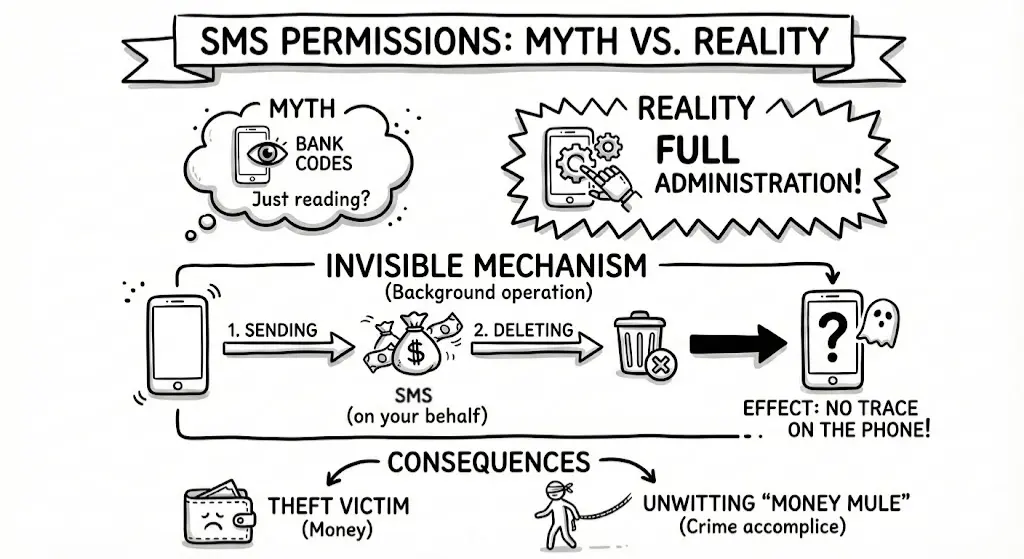
We tend to think SMS access is dangerous because someone might read our bank codes. That is true, but the scenario outlined by experts is far more unsettling.
“By granting specific permission for SMS messages (…), we give someone the ability to write texts for us. This means someone can write a message, delete it, and we wouldn’t even know it was ever sent.” (Adrian Żółkiewicz)
Granting an app SMS permissions often means agreeing to full message administration. Malware can not only read your messages but also send texts on your behalf and subsequently… delete them from the “Sent” folder before you ever see them.
Why it matters: You could unknowingly become an accomplice in a crime or a victim of financial theft, leaving absolutely no trace on your phone.
The green dot is your sentinel
Modern systems (Android and iOS) have introduced a subtle but powerful defense tool: sensor usage indicators. These are the small, colored dots (usually green or orange) appearing in the status bar at the top of your screen.
They signal that an app is currently using your microphone or camera. If you are browsing a static website or playing Solitaire and the camera activity LED lights up – someone is watching you.
“If, for example, we aren’t using the camera and that [green] light turns on, it is a signal for us (…) that someone might be controlling our phone.” (Adrian Żółkiewicz)
Why it matters: This is the only way to detect spying in real-time. If you aren’t using the camera and the light is on – check your settings immediately.
App stores are not always a safe haven
Downloading apps even from official sources (Google Play, App Store) is not a guarantee of absolute safety. While these stores filter millions of apps, scammers can be clever.
Verification in the Apple ecosystem is often more rigorous (involving human review), but in any store, the key is your “social verification.” Before installing an unknown app, look at the number of downloads and, most importantly, the latest comments. Users are often the first to report that an app began behaving suspiciously after the latest update.
Why it matters: Your first firewall is common sense; your second is the feedback from other users.
Reflection for the future
Mobile technology strives to be “invisible” and convenient, but the price for this convenience can be high. You don’t have to throw your smartphone away. Just spend five minutes once a month checking the Privacy Dashboard in your phone settings to revoke permissions for apps you no longer use.
You can listen to the full interview on Radio Zachód by clicking here.
Looking to enhance your cybersecurity?
Contact us!
Leave your details – we’ll call you back
Our specialist will get back to you no later than the next business day. You don’t have to fill in the message field, but a brief note about the topic you’re interested in will be a valuable hint for us.