

PAM – Privileged Access Management
PAM (Privileged Access Management) provides protection against data leaks. It means taking full control of information within your company.


Partners

IT Security
Data Security
PAM – Privileged Access Management
A company’s value lies largely in the data it collects. It is not just about utilizing it skillfully, but also securing it properly. The threats are numerous:
uncontrolled information leaks,
theft of data crucial to the company’s growth and market success,
ransomware and the resulting loss of operational capacity (e.g., production line downtime, loss of customer data).
PAM (Privileged Access Management) solutions are essential tools for large organizations that, while optimizing structure and costs, opt for specialized outsourcing services requiring a remote connection to the company’s IT ecosystem.
It is also a highly effective tool for managing remote employee access. It eliminates the risk of the IT ecosystem being compromised should individual employees’ devices become infected.
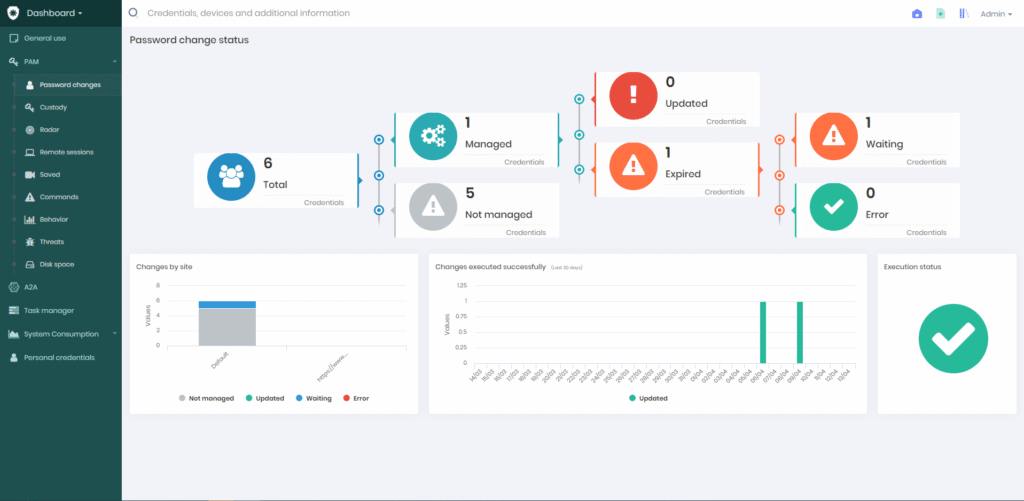
The organization maintains full control over data flow. Through PAM software, it manages users who can log in only to specific enterprise systems. Following the ZERO TRUST principle, external users have access only to the areas and information explicitly shared with them.
When should you implement PAM?
PAM solutions are particularly important when:
using outsourcing companies that require a remote connection to your IT infrastructure,
working in a remote or hybrid model,
needing to protect sensitive and confidential data,
implementing the Zero Trust principle within the organization,
meeting regulatory compliance requirements.
How does Privileged Access Management software work?
PAM provides administrators with tools for granular control over system users and real-time verification of their privilege status.
Key features of PAM for your company:
Automated password management, which can be scheduled in cycles (e.g., monthly) or executed every time an admin session ends.
Passwordless login capability, allowing users to access necessary systems without ever seeing the credentials.
Remote console enabling real-time monitoring of live sessions and, if necessary, session recording.
Fast deployment.
A transparent and easy-to-use console.
Centralized management and control over user access to individual systems across the organization.
What capabilities does a PAM administrator have?
Defines the scope of user privileges: It is best practice to assign them according to the principle of least privilege – the user has access only to the areas essential for their work.
Verifies these privileges: Has something changed? Has an outsourcing company finished a project phase? The administrator can quickly check and update the access scope for external specialists.
Restricts access for internal remote workers only to resources necessary for their tasks. This protects against the disclosure of company secrets and unfair competition, while also reducing the ransomware attack surface.
Logs users into company systems without revealing passwords, which elevates credential security and limits their exposure.
“Sees” exactly what the user did during a session with privileged credentials, where they did it, and when – making all operations fully accountable.
Want to know more?
Learn how to manage privileged access in your organization and ensure the highest level of credential protection.
Discover more about Senhasegura:
In what form does it operate?
How do you connect to systems, hardware, and services using a PAM solution?
What access policies can you define?
How can you access session recordings?
How does the command filter work?
The recording duration is just under 40 minutes.
Are you looking for a solution to monitor data management? Check out DLP systems!

Consultings
We will help you choose the right solution.

Training
We offer training on hardware and software usage.

Implementations
We conduct comprehensive IT implemenations.
Looking to enhance your cybersecurity?
Contact us!
Leave your details – we’ll call you back
Our specialist will get back to you no later than the next business day. You don’t have to fill in the message field, but a brief note about the topic you’re interested in will be a valuable hint for us.